
Reading the Player Pool
Every player on the slate gets one row. Here's what each MLB Classic column means, left to right.
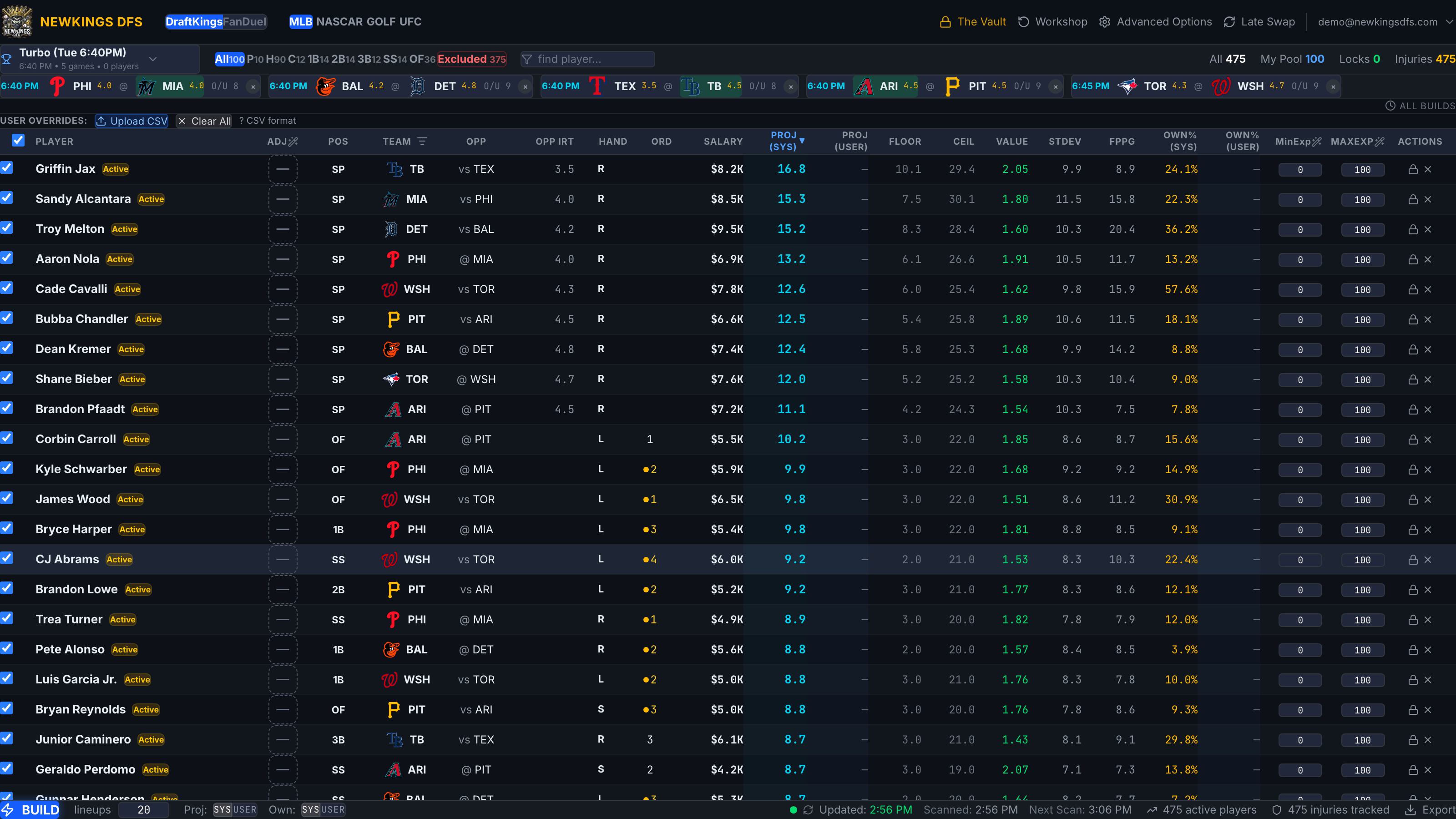
1Opp IRT
2Ord
3System projection
4Lock / exclude
5Projected-lineup dot
1
Identity and status
| Column | Meaning |
|---|---|
| checkbox | In-pool toggle. Unchecked = excluded from builds. The header checkbox toggles everything currently visible. |
| Player | Name. Click it to open the player card popover. Badges appear here for injuries (OUT / DOUBTFUL / questionable) and exclusions (Manual or Not starting). |
| Adj | The per-player boost/nerf control — covered in Per-Player Exposure & Boosts. |
| Pos | DraftKings position(s). Multi-position players show both (e.g. 2B/SS). |
| Team / Opp | Team with logo; opponent with vs (home) or @ (away). The Team header also holds a view-only team filter. |
2
Vegas and lineup context
| Column | Meaning |
|---|---|
| Opp IRT | Opponent's Vegas implied run total — pitchers only (the run total of the team they face). Lower is a friendlier matchup context; blank for hitters. |
| Hand | Batter handedness (L/R/S) or pitcher throwing hand. |
| Ord | Batting order 1–9. A plain number means the lineup is confirmed; an amber number with an amber dot means it's projected and may change. Blank = not in the lineup. |
3
Projection numbers
| Column | Meaning |
|---|---|
| Salary | DraftKings salary, shown as $X.XK. |
| Proj (Sys) | The system projection in fantasy points — what the optimizer maximizes by default. |
| Proj (User) | Your override, if you've set one — see Projection & Ownership Overrides. |
| Floor / Ceil | Downside and upside of the projection distribution. |
| Value | Points per $1K of salary, computed from whichever projection source the build is using. |
| StDev | Spread of the projection distribution — higher means more volatile. |
| FPPG | Season fantasy points per game (actuals, not projection). |
| Own% (Sys) / Own% (User) | Projected field ownership — system and your override. |
| MinExp / MaxExp | Per-player exposure bounds for the build, 0–100%. |
| Actions | The lock (padlock) and exclude (×) buttons — next tutorial. |
Click any column header to sort by it; the sorted header turns blue with a ▼/▲. Shift-click a second header to add a secondary sort (shown dimmer) — e.g. sort by Team, then salary within each team.
A hitter with a blank Ord is not in the projected lineup. If the game's lineup is confirmed, non-starters are auto-excluded from builds (the orange Not starting badge) — see Locking, Excluding & Auto-Excludes.
Strategy guidance coming soon
How to weigh projection, value, ownership, and Vegas context against each other