
Picking a Slate
A slate is a group of games with a shared lock time — every DFS contest is attached to one. The optimizer loads one slate at a time; the slate selector sits at the left end of the bar above the player pool.
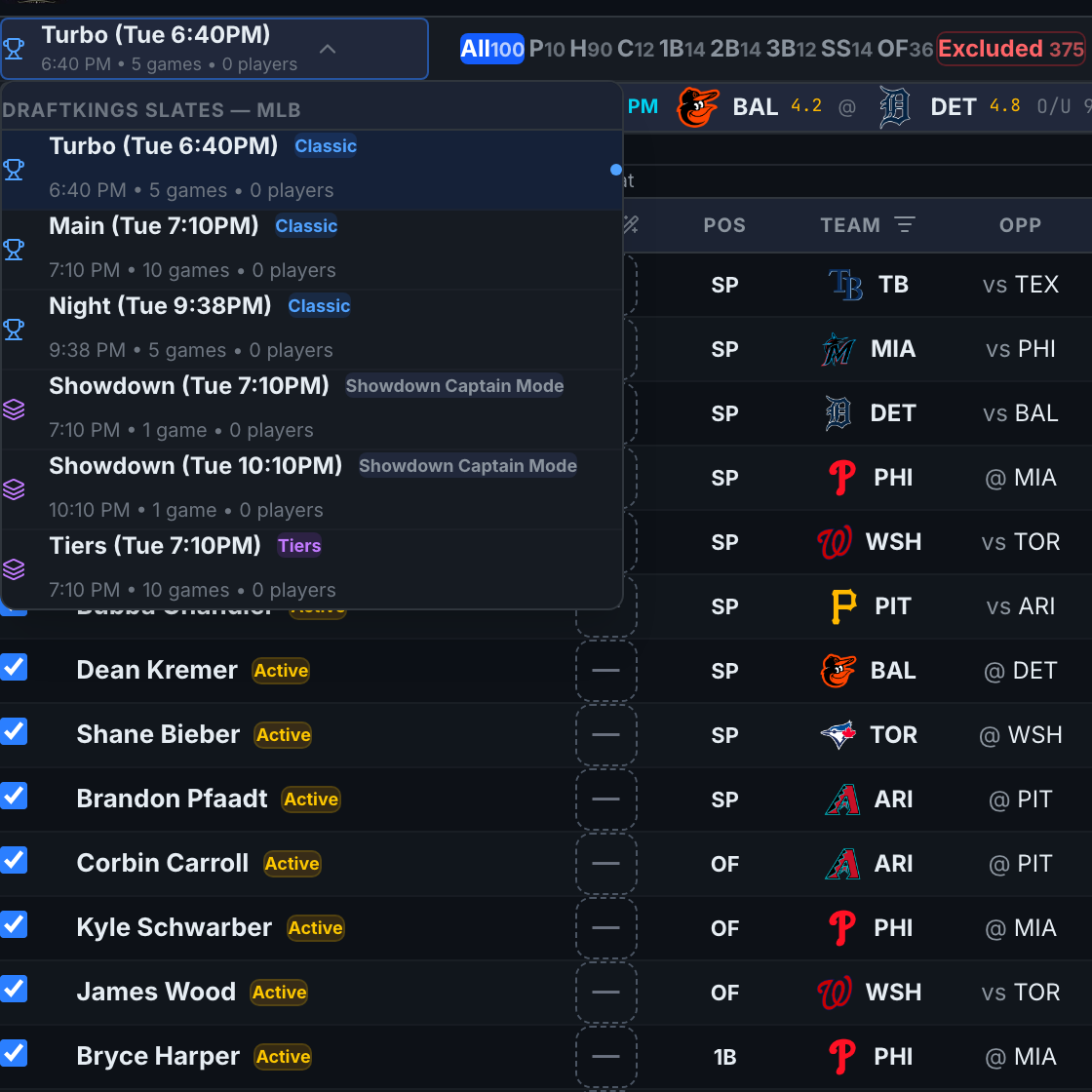
Open the slate dropdown
Click the slate button. It always shows the current slate's name plus its first lock time, game count, and player count underneath.

Read the slate list
Each row in the dropdown shows:
- Name — DraftKings' slate name (e.g. Main, Turbo, Night).
- Game-type badge — Classic (blue), Showdown (amber), or Tiers (purple). Classic is the standard 10-spot MLB roster; Showdown is a single game with a Captain spot; Tiers is pick-one-per-tier with no salaries.
- First lock • game count • player count — the small grey line.
Click a row to load it. The pool, game cards, and counts all refresh.
Check the counts on the right
The right side of the slate bar summarizes the loaded pool: All (players on the slate), My Pool (players not excluded), Locks, and Injuries. These update live as you work.
Showdown slates hide the Late Swap button and some Classic-only columns — one game means the whole lineup locks at first pitch, and the roster is CPT + FLEX instead of positions.