
Filtering & Searching
Three tools above the pool control what you see: position chips, the player search, and sortable headers. All of them are view filters — they change what's displayed, never what the optimizer uses.
Position chips
Click a chip — All, P, H, C, 1B, 2B, 3B, SS, OF — to show only that position. Each chip carries a count of matching players. H is all hitters. The red Excluded chip at the end flips to a view of everything currently excluded (manually or automatically), with the reason badged on each row.

Player search
Type in the find player… box to filter rows by name as you type. The × clears it. Search combines with the active position chip.
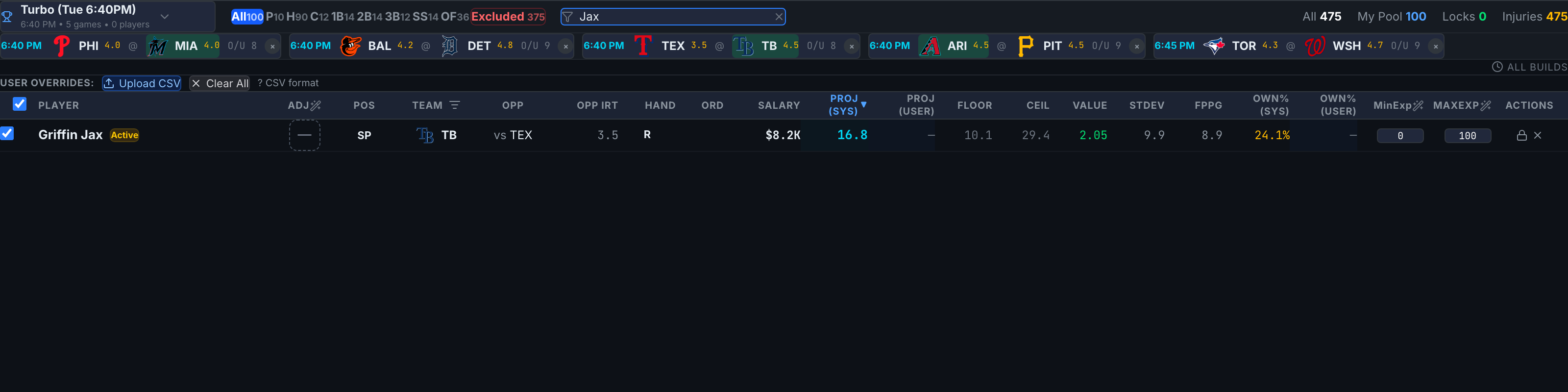
Sorting — single and dual column
Click a header to sort descending; click again to flip. The active header is blue with a ▼/▲ arrow. Shift-click a different header for a secondary sort, shown in dimmer blue — the pool sorts by the primary first, ties broken by the secondary. The default sort is Proj (Sys), descending.
The Team column filter
The funnel icon in the Team header hides teams from view. When active, a blue chip above the table shows "Teams: showing X of Y" plus a row counter — and reminds you this is view-only: the full pool is still being optimized. To actually remove a team from builds, use the game cards (Excluding Games & Teams).
Filters never affect a build. The one crossover: the header checkbox and the bulk-edit wand act on currently visible players, so filter first, then bulk-act on exactly the set you see.