
The Vault
The Vault (top nav) is a read-only research surface for the current slate: simulated stat lines and the probability each player clears value multiples of their salary. Nothing in it changes your build until you use its action controls.
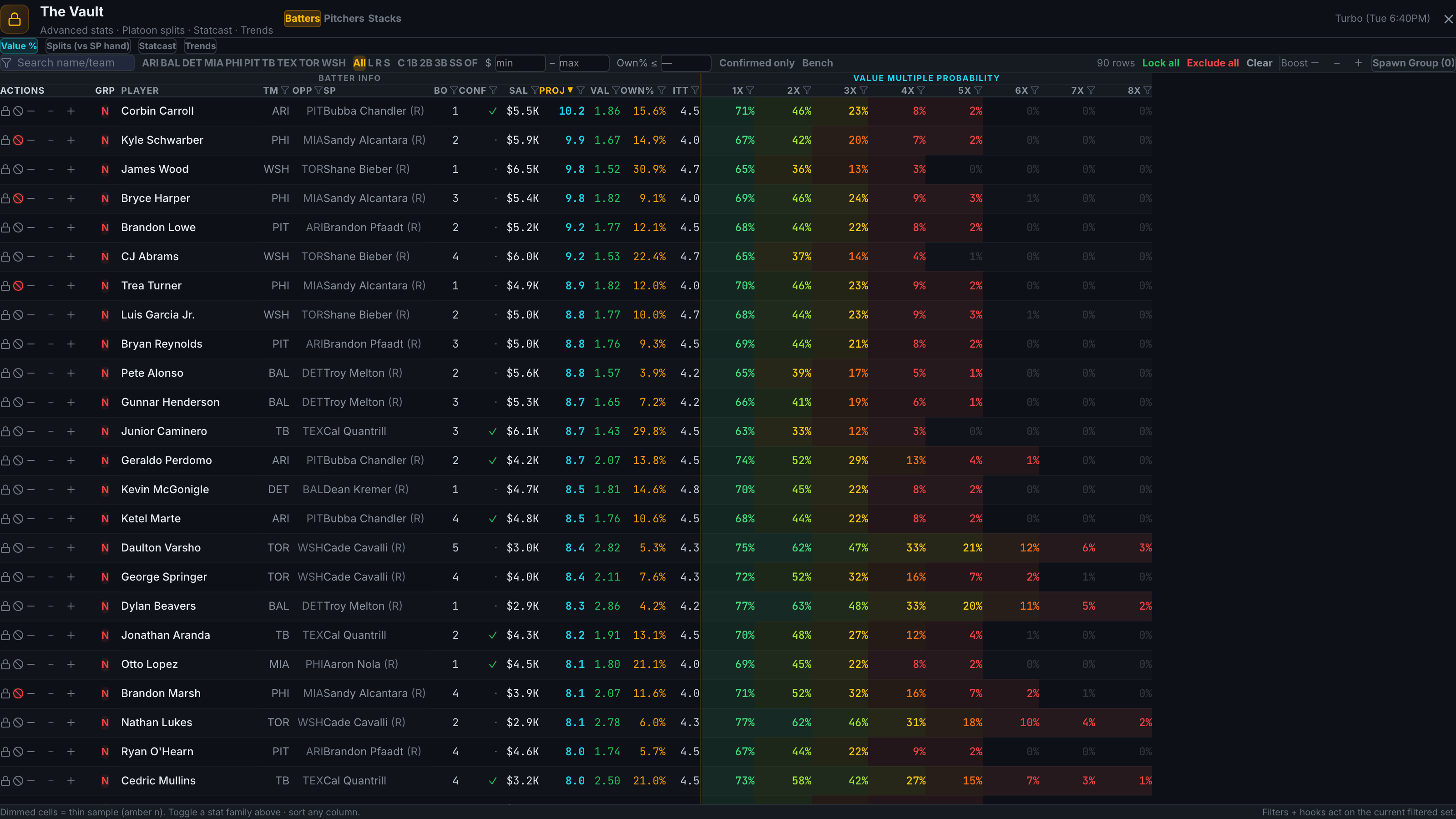
Value-multiple probabilities
The core view shows, per player, the probability of reaching 1× through 8× value (fantasy points per $1K of salary), heat-mapped — greener cells mean higher probability. Batters and pitchers have separate views; each also shows the projected stat line behind the number.
Stat families
Tabs switch the column family: value multiples, Splits (e.g. wOBA, ISO, K% by matchup handedness), Statcast, and Trends over recent windows. Cells with small samples render dimmed — a thin row or faded cell means the underlying sample is below the reliability threshold, not that the number is zero.
Filter, search, sort
The toolbar filters by team and position, searches by name, caps by
projected ownership (Own% ≤), and every column header sorts. Conf
marks confirmed-lineup players.
Act on what you find
Selection actions wire straight back to the build screen: lock, exclude, or boost players from inside the Vault, or spawn a Group from the selected players. Close the Vault and the pool reflects everything you did.
The Vault reads the same slate you have loaded — switch slates on the main screen first if you want to research a different one.