
General Settings
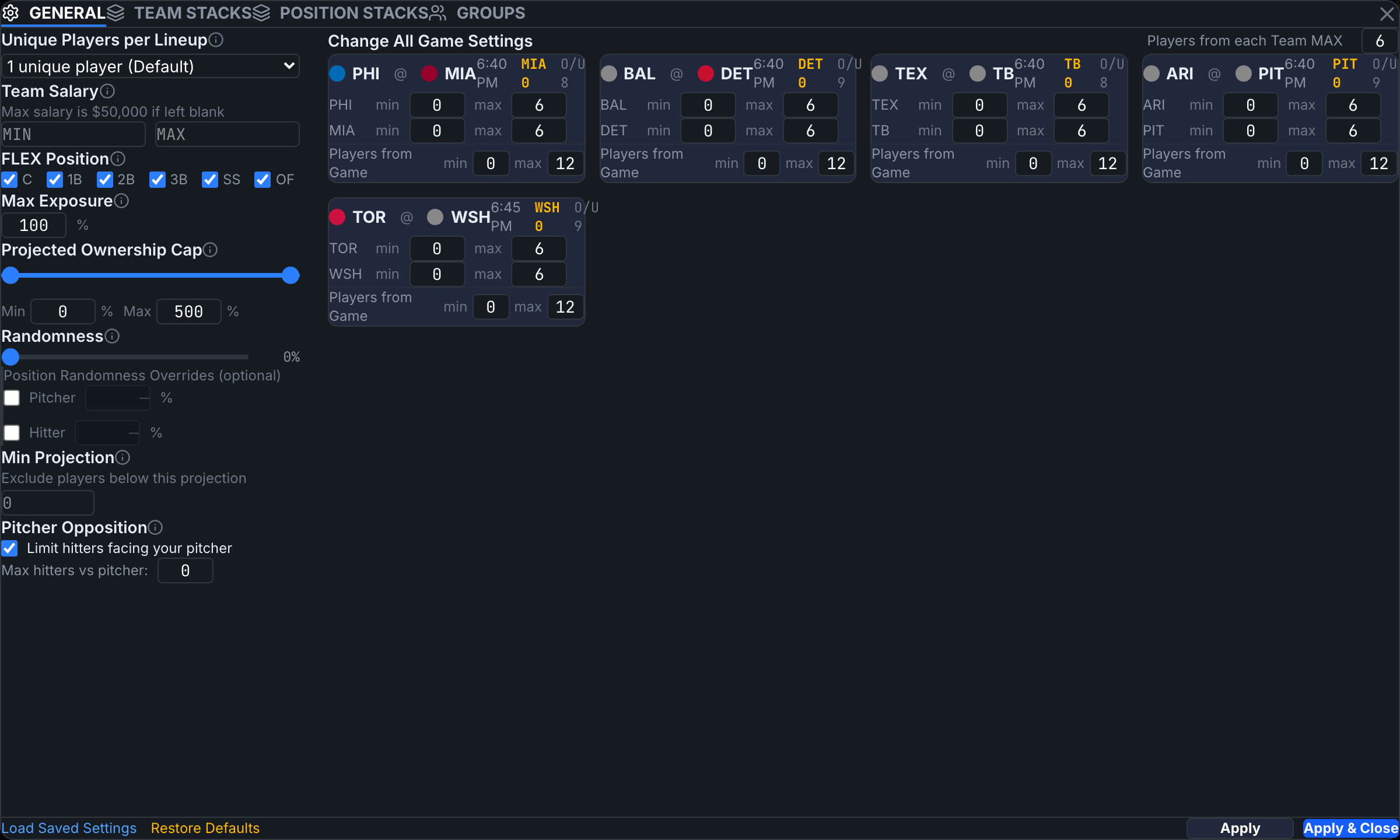
Advanced Options in the top nav opens the settings modal. The GENERAL tab holds the global constraints every build obeys. Settings apply live — Apply just acknowledges; Apply & Close closes the panel.
Lineup shape
- Unique Players per Lineup — the minimum number of players that must differ between lineups. 1 (default) allows near-duplicates; higher values force diversity.
- Team Salary — MIN/MAX total lineup salary. Blank MAX = the platform cap ($50,000 DK; $35,000 FD MLB).
- FLEX Position — which positions may fill the UTIL slot (FanDuel MLB). Uncheck a position to bar it from UTIL.
Exposure and ownership
- Max Exposure — a global cap on the % of lineups any single player can occupy. 100% = uncapped. Per-player MinExp/MaxExp columns override this for individuals, and locked players are exempt from their own cap.
- Projected Ownership Cap — bounds the sum of projected ownership across a lineup's players. The 0–500 default is no constraint; a lower max forces less chalky lineups, a higher min forces chalkier ones.
Randomness and floors
- Randomness — adds noise to projections per lineup so the set doesn't collapse onto one optimal. 0% = pure optimization. MLB adds optional pitcher/hitter overrides — covered in Pitcher / Hitter Randomness.
- Min Projection — drops players projected below the threshold from the optimizer pool (locked players are exempt).
- Pitcher Opposition (MLB) — limits how many hitters facing your rostered pitcher can share the lineup. Default: enabled, 0 hitters — your lineups never bat against their own pitcher unless you allow it.
Per-team and per-game limits
The right side shows one card per game with min/max players per team (0–6) and min/max players per game, plus a "Players from each Team MAX" control that sets every team at once. Vegas lines are displayed on each card for context.
Footer controls
Restore Defaults resets everything on this tab and the stacks/groups tabs to first-login state. Load Saved Settings restores your saved configuration. Settings persist per slate.
Constraints multiply. A tight salary window + low max exposure + several locks can leave the solver nothing to build — if you hit infeasible, loosen the last thing you changed.